BLOG
How to manage a vacation rental remotely (2026)
 By Nangyal Khan··Updated
 11 min read
Last updated: October 28, 2026
To manage a vacation rental remotely, you need six things working together: a channel manager so one calendar feeds every booking site, a smart lock that issues a fresh code for each stay, a cleaner and a local contact who can be at the door within 30 minutes, monitoring that tells you about noise, smoke, occupancy and climate, AC automation so empty rooms aren't cooled all week, and a set of message templates that do most of the talking. Below is what each part does, what it can't do, and a full week of a rental run from another city.
The remote stack, part by part
Remote hosting means running a rental where you can't drop by, so every task that used to be "I'll pop over" has to belong to a tool or a person. The table shows how the six pieces split the work.
| Part | What it handles | What still needs a person |
|---|---|---|
| Channel manager | One calendar across every booking site; rates; no double bookings | Pricing decisions; reading reviews |
| Smart lock | A unique code per stay, active from check-in to checkout | Battery swaps; a backup key with the local contact |
| Cleaner and local contact | Turnovers, restocking, a knock on the door when needed | Paying them fairly and on time |
| Monitoring | Noise, smoke, occupancy, temperature and humidity, reported to your phone | Deciding what to do when an alert lands |
| AC automation | Cooling before arrival, switching down in empty rooms | Servicing the unit |
| Message templates | Confirmation, arrival, mid-stay, warnings, checkout | Answering the odd question no template covers |
Channel manager
If you list on more than one site, a channel manager stops the most avoidable disaster in remote hosting: the double booking you can't fix by driving over. It syncs availability and rates across sites. Check that yours can send scheduled messages and push cleaning tasks to your team, since the templates below rely on it. Pick one before anything else, because the rest of the stack hangs off its calendar.
Smart lock
A smart lock that creates a unique code for each booking, valid only from check-in to checkout, removes the key problem and the old-code problem in one go. Keep a physical backup key with your local contact. Locks run on batteries, so check the level at every turnover rather than waiting for a low-battery warning on a Friday night.
Cleaners and a local contact
No app replaces a reliable cleaner. Agree a fixed turnover checklist, ask for a photo of each room when they finish, and pay promptly. Your local contact may be the same person or a neighbour you trust. Their job is to answer the phone and reach the door within 30 minutes for a lockout, a leak or a noise problem.
Monitoring
This is the part that gives you eyes without cameras, and Airbnb doesn't allow indoor cameras anyway (Airbnb, article 3061, checked October 28, 2026). Four signals matter:
- Noise, as a decibel level, so you hear about a loud night before the neighbours call.
- Occupancy, from radar presence sensing that counts people without images, so you know if there are more guests than booked or anyone inside an empty house.
- Smoke, so a cigarette or vape in the living room doesn't stay a mystery until the next guest complains about the smell.
- Climate, meaning temperature and humidity, so a failed AC or a damp week shows up before it becomes a bad review or a mold problem.
For remote monitoring of an investment property with more than one unit, look for one app that covers every property, no per-property fees, and a way to connect to the rest of your stack. Layla's All-in-One plan ($299 once) turns on all four signals from one camera-free sensor, adds AC control, and has no subscription and no per-sensor or per-property fee; it also has an open API for connecting to a property management system. Only need smoke? Smoke & Air Quality, $99 once.
AC automation
An AC left running through a week of empty nights is money you'll never see. Remote control fixes half of it, since you can set the temperature from your phone before a guest arrives. Automation fixes the rest. Layla's Eco Mode uses occupancy to pause the AC when nobody is in the room and turns it down between stays, while schedules cool the place before check-in. It works with most split and mini-split systems, though compatibility varies by brand and model.
Message templates
Templates save you the same message typed fifty times, and their tone sets the mood of the stay. Five are worth having from day one. Paste them into your channel manager's scheduled messages and edit the details.
Booking confirmed "Hi [name], thanks for booking. Your stay is confirmed for [dates] for [number] guests. The house rules, including quiet hours and the maximum number of overnight guests, are in the listing, so please give them a quick read before you arrive. Any questions, just message me here."
Arrival (send 24 hours before) "Hi [name], your door code is [code], active from [check-in time] on [date] until [checkout time] on [date]. Wi-Fi is [network / password]. The home has a noise level monitor in the living area; it measures volume only and records nothing. If anything isn't right, message me and [local contact name] can be there quickly."
Mid-stay check (send the first morning) "Morning [name], just checking everything is good with the place. Anything you need?"
Noise reminder (first alert) "Hi [name], the noise monitor shows it's getting loud, and quiet hours started at [time]. Could you bring it down for the neighbours? Thanks for understanding."
Checkout (send the evening before) "Hi [name], checkout is at [time] tomorrow. The checkout details are in the listing under House rules and requests, and the door locks automatically behind you. Thanks for staying, and safe travels."
Keep the templates to reminders of what your listing already says. Airbnb launched seven standard house rules on October 20, 2026, and its new policy, which takes effect November 20, tells hosts not to write additional rules in messages (Airbnb, important changes to house rules). Guests are required to follow those seven rules. Everything else, checkout chores included, is a reasonable request that guests are encouraged to follow, and it goes in the listing's House rules and requests section rather than in a message (Airbnb, article 472; both checked October 28, 2026). If your listing's rules and requests aren't written yet, a vacation rental house rules template gives you the wording for quiet hours, guest numbers and smoking.
One week, run from another city
This is how the stack plays out over an ordinary week. You live three hours from a two-bedroom rental. You haven't been there in a month.
Monday. The weekend guests check out at 11:00. Their door code expires at the same minute. The cleaner arrives at 11:30 and sends photos of each room by 14:00, plus a note that the bathroom fan is rattling. You add it to the list for the handyman and switch on vacant-home alerts from the app. Eco Mode has already turned the AC down.
Tuesday. Nothing booked. You glance at the app over coffee: no movement, 24°C (75°F) inside, humidity at 52%. Nothing to do. A booking request comes in for Saturday night only, from someone in the same city, with a new profile and the line "small get-together". You ask what brings them to the area and how many guests, exactly. Four of the six red flags in our guide to screening for a party booking are already showing.
Wednesday. The Saturday guest doesn't reply. You decline. A different request comes in for Thursday to Sunday, a couple visiting family, with reviews. You accept. The channel manager blocks the dates everywhere, the smart lock creates their code, and the confirmation template goes out on its own.
Thursday. The guests already have their code; the arrival template sent it yesterday afternoon. The schedule cools the flat an hour before check-in, and you turn off vacant-home alerts. At 16:10 the occupancy reading shows two people. The mid-stay message goes out the next morning.
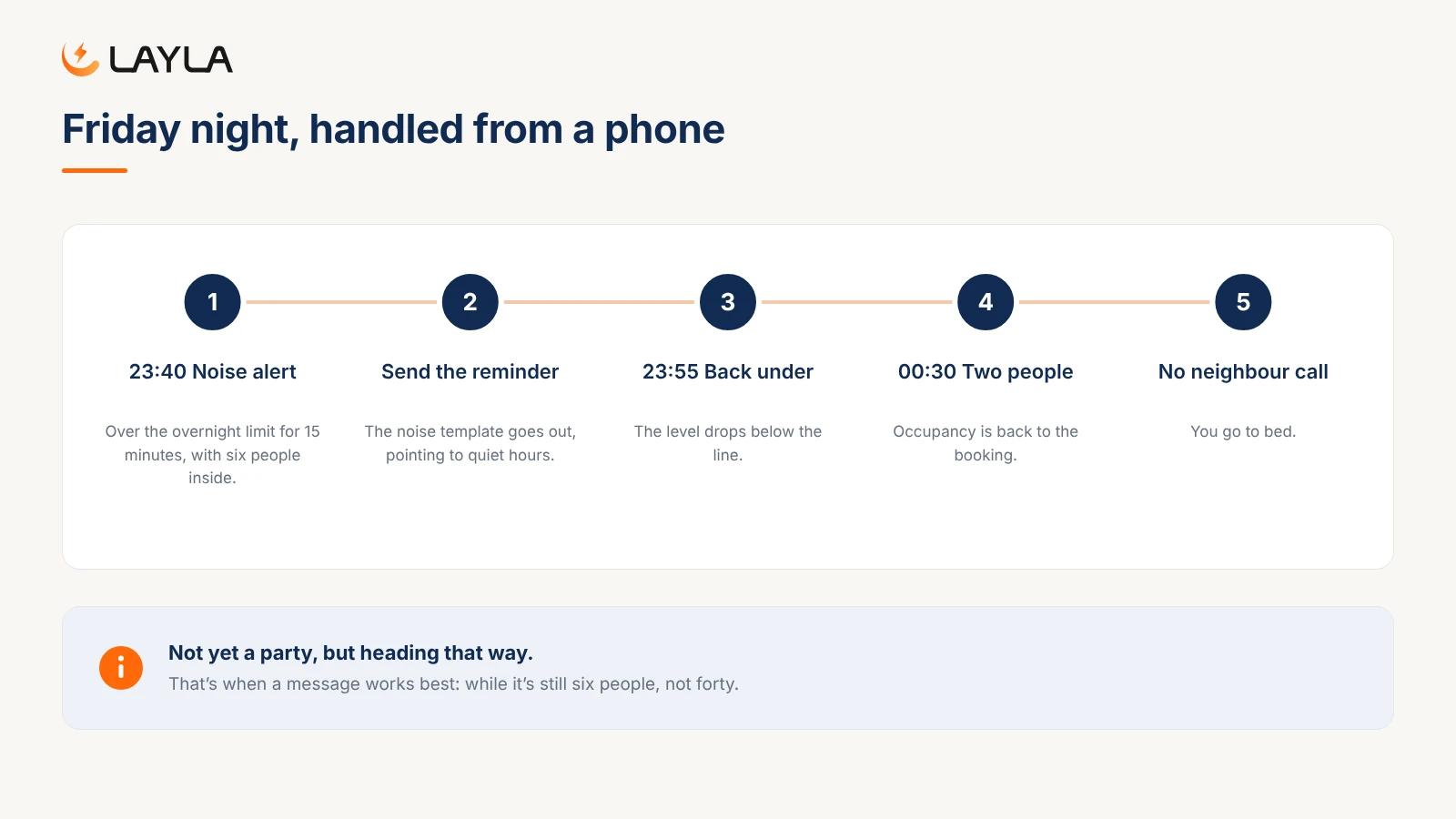
Friday. At 23:40 a noise alert lands: the living room has been over your overnight limit for 15 minutes, and occupancy shows six people — not yet a party, but heading that way. You send the noise reminder template. By 23:55 the level is back under the line and occupancy drops to two by 00:30. No neighbour call. You go to bed.
Saturday. Humidity in the living room climbed to 70% for most of the morning, after showers with the rattling bathroom fan off. You message the guests to say the fan will be fixed and that the bathroom window opens if it gets steamy, then book the handyman for Monday's turnover.
Sunday. The checkout template went out last night. Occupancy drops to zero at 10:48, the code expires at 11:00, Eco Mode turns the AC down, and the cleaner starts at 11:30. You switch vacant-home alerts back on.
Total time spent that week: a handful of messages and a few glances at a phone. That's what the stack is for.
Where remote hosting goes wrong
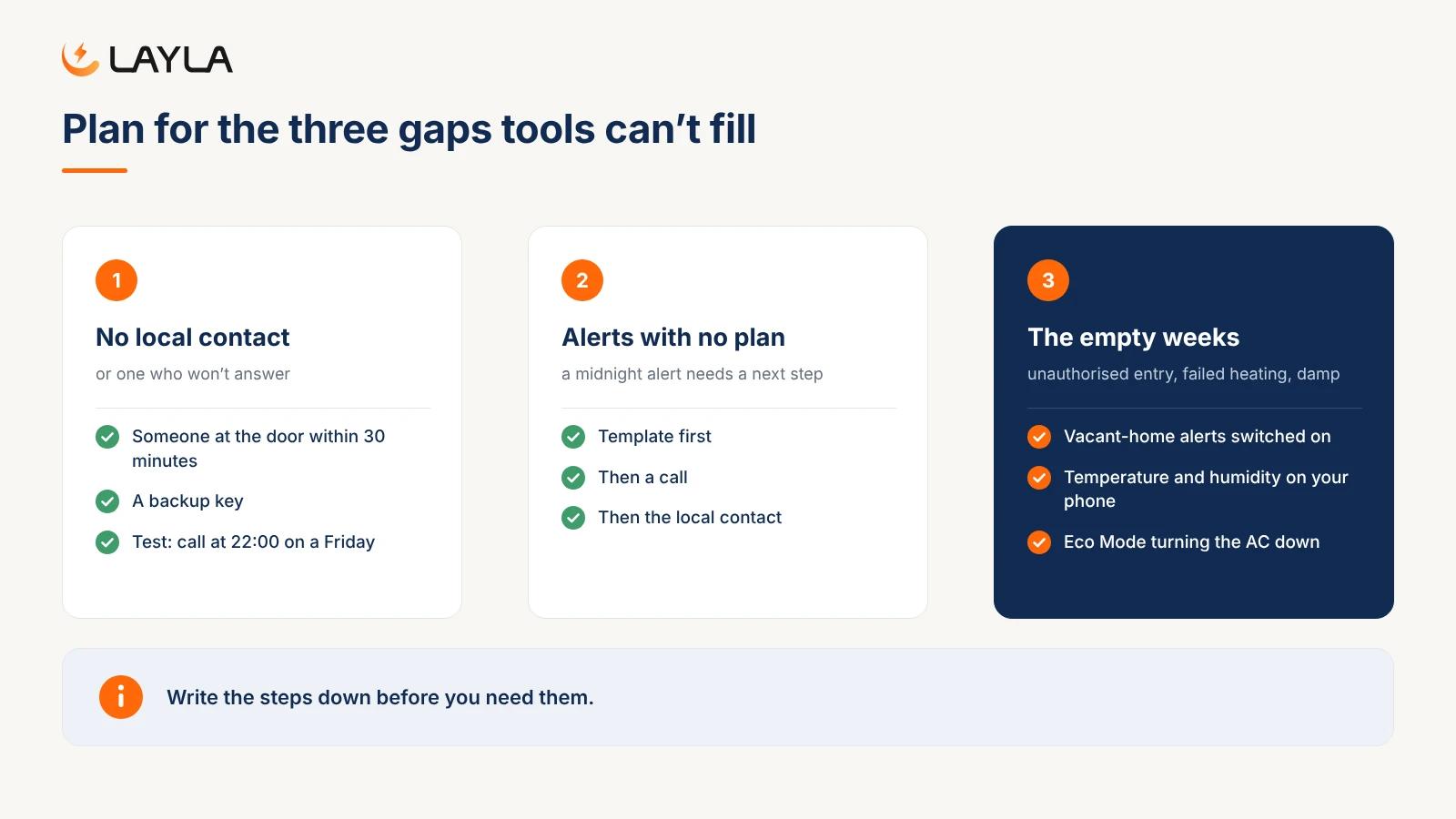
Even with every tool in place, plan for three gaps.
No local contact, or one who won't answer. Every system above assumes that, once in a while, a human can get to the door. Test it: call your contact at 22:00 on a Friday and see if they pick up.
Alerts with no plan. A noise alert at midnight is only useful if you already know what you'll do: template, then a call, then the local contact. Write the steps down before you need them.
The empty weeks. The quiet weeks between guests carry their own risks: unauthorised entry, failed heating, damp. Our guide on how to protect a vacant rental property between stays covers that, and the vacation rental safety checklist lists the alarm tests and yearly jobs your local contact should own.
All-in-One: the monitoring and AC parts in one sensor
The week above leaned on two parts of the stack more than any other: monitoring and AC automation.
All-in-One puts both in one small, camera-free sensor for $299, once. You get noise monitoring with quiet hours, radar occupancy and the AI party detector, radar intruder and vacant-home alerts, smoke detection that tells cigarette, vape and cannabis apart, air quality and humidity with a mold-risk early warning, indoor and outdoor temperature, and AC control with Eco Mode and schedules. Every property sits in one app, with 180 days of history and incident reports. One sensor covers one room; for the whole property, most hosts use two or three in key areas.
FAQ
How do you manage a vacation rental remotely?
Build a stack of six parts: a channel manager for one calendar across booking sites, a smart lock with a code per stay, a cleaner and a local contact within 30 minutes, monitoring for noise, smoke, occupancy and climate, AC automation for empty rooms, and message templates for each stage of the stay. Then write down what you'll do when an alert lands.
Is there a monitor that watches temperature and humidity in a rental property remotely?
Yes. Several rental sensors report indoor temperature and humidity to your phone, so you can spot a failed AC, a heating problem or damp building up while you're away. Layla's sensors include temperature and humidity on every plan, indoor and outdoor on Noise & Security Pro and All-in-One, with a mold-risk early warning on Smoke & Air Quality and All-in-One.
What are the best property monitoring solutions for managing vacation rentals remotely?
Look for a device that covers noise, occupancy, smoke and climate without cameras, works across all your properties in one app, and doesn't charge per property each year. Radar occupancy counts people without images, and decibel-only noise monitoring records nothing. One-time-purchase sensors avoid the yearly renewals that add up across several units.
Do I need a local contact if I host remotely?
Yes. Tools handle codes, calendars and alerts, but someone still has to reach the door for a lockout, a leak or a loud night. Pick a person who can get there within 30 minutes, give them a backup key, agree a rate for call-outs, and test that they actually answer at 10 p.m. on a Friday.
Can I control the AC in my rental remotely?
Yes, with a smart AC controller. Layla's AC Control & Energy features, included in All-in-One, let you set the temperature from the app, run schedules that cool the rental before check-in, and use Eco Mode, which pauses the AC when rooms are empty. It works with most split and mini-split systems, though compatibility varies by brand and model.

Best for: full property coverage
All-in-One
Noise monitoring, smoke detection and smart AC control for complete coverage.
Everything included
Everything in Noise & Security Pro
AI party detector, noise alerts, intruder & break-in, occupancy, 180-day history, indoor + outdoor climate
Everything in Smoke & Air Quality
Air quality index (IAQ), CO2, bVOC, mold & smoke — full indoor + outdoor climate
Everything in AC Control & Energy
Smart AC (150+ brands), Eco Mode, schedules, filter health
Plus exclusive
- Advanced reports & insights
- Priority support
- Priority support
No monthly fees. Ever.
One sensor. Full coverage
One sensor. Full coverage.* Layla 3.0 monitors noise, air quality, motion, occupancy, temperature, humidity, pressure, VOCs, CO2, and controls your AC - from a single device on your shelf.
No subscription means no surprise costs.
Pay once. Every feature unlocked. Forever. No monthly fees eating into your rental margins or household budget.
The smartest buy is the one you make once.
Other solutions charge per-feature monthly subscriptions that exceed the device cost within a year. Layla's all-in-one pays for itself compared to any subscription alternative.
30-day money back guarantee